
If you are Uninstalling your Google Chrome All your History, Saved Passwords, Download history and Bookmarks will be deleted. One of the most important thing we use in Google Chrome is Bookmarks There is a simple way to backup all your Google Chrome bookmarks.
You can make a backup of your bookmarks by going to Wrench >Bookmarks> Bookmark manager > Organize > Export bookmarks


If you want to restore all your bookmarks just click Wrench >Bookmarks> Bookmark manager > Organize > Import bookmarks.
Now, Select the HTML file you want to import and click OK. Now, you will see a new Tab in the in the Bookmark Bar named Imported

When ever you need to switch between open windows in Windows XP or 7 you need to press Alt+Tab.It will work on both windows XP and 7. But now in Windows 7, this feature has a little Difference


Never heard about Aero Flip 3D. It is the new feature in Windows 7.This feature is used to switch between open windows. just click Windows Key + Tab.To use Aero Flip 3D, Press and hold the Windows button along with the tab key,holding the windows button press the tab key to move the Flip 3D. This will move the windows in a Sequence and you can see all your windows in sequence. Once you see the window that you want to open, release the windows and Tab buttons. This will open the selected window

The behavior of the Windows Key + Tab key is same as the Alt + Tab key but the only difference is how the open windows appear on your screen.

You may have seen the Send-To menu especially when you are transferring data to Pen drive. By default
the Send-To menu in Windows is
Compressed Zip Folder
Desktop (Create short cut)
My Documents
CD drive
ADD NEW LOCATIONS IN SEND-TO MENU
ADD NEW LOCATIONS IN SEND-TO MENU
To Add a shortcut to Send-To menu
1. First Click Start and click Run
2. In Run click sendto and click OK


3. Now in the Send-To Directory add your selected Locations by creating a shortcut for it


4. To create a shortcut just right click on the selected file and go to send-to menu and click on
Desktop (create Shortcut) and copy the shortcut of selected file in Send-To directory


REMOVE LOCATIONS FROM SEND-TO MENU
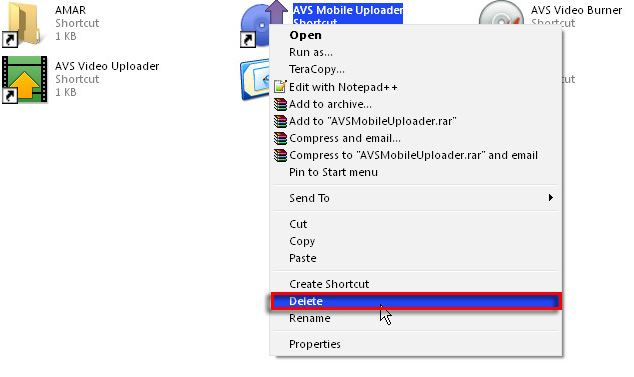
To Remove the Locations from Send-to menu simply Delete the shortcut Files from Send-to Directory

 Finally Send-To menu changes to:


REMOVE LOCATIONS FROM SEND-TO MENU
To Remove the Locations from Send-to menu simply Delete the shortcut Files from Send-to Directory


Recently i installed tata docomo sim on my iPhone 2g and i tried to access GPRS from that iPhone
but, it says could not activate cellular data network

There is a simple trick to solve this problem
first goto Settings on your iPhone and to General and then go to Network
and turn on Data Roaming


Now go to Cellular Data Network and Type TATA.DOCOMO.INTERNET in the place provider after APN and leave the remaining options blank


but, it says could not activate cellular data network

There is a simple trick to solve this problem
first goto Settings on your iPhone and to General and then go to Network
and turn on Data Roaming


here you go now open your safari browser and you can surf the DOCOMO internet on iPhone

Once again Facebook updated its chat and it fails to reach its users.The new Facebook chat has more disadvantages than advantages

The main disadvantages in Facebook New chat is:
In order list of people in online and offline
You have to disable the Sidebar chat by your self
Methods to get the old Facebook chat back:
The best way to get the Old Facebook chat back is by installing the Add-ons in your Browser
Google Chrome Users Click here
Firefox Users Click here
Opera Users Click here
Install the Add-ons on your Browser from the above links and refresh your browser by clicking F5

The main disadvantages in Facebook New chat is:
In order list of people in online and offline
You have to disable the Sidebar chat by your self
Methods to get the old Facebook chat back:
The best way to get the Old Facebook chat back is by installing the Add-ons in your Browser
Google Chrome Users Click here
Firefox Users Click here
Opera Users Click here
Install the Add-ons on your Browser from the above links and refresh your browser by clicking F5
Timeline is a new way of presenting yourself on Facebook...
Now,you can get Timeline for your FB account in less than 5 min...........Follow these Steps carefully
Step:1
Login to your FB account and click on this link

If you are using this page for first time click allow to access your basic information

Step:2
Click on Create New App and give your App a name and click Continue


Step:3
Enter both words below, separated by a space in the box provided below and click submit

Step:4
Now,click on open Graph and form a sentence
People can ................... a ......................
and click get started and wait until your browser relodes


Step:5
Now go to your profile and click get it now and your profile get Timeline feature before Facebook releases it to ever one

It looks Some thing like this


If you are using this page for first time click allow to access your basic information

Step:2
Click on Create New App and give your App a name and click Continue


Step:3
Enter both words below, separated by a space in the box provided below and click submit

Step:4
Now,click on open Graph and form a sentence
People can ................... a ......................
and click get started and wait until your browser relodes


Step:5
Now go to your profile and click get it now and your profile get Timeline feature before Facebook releases it to ever one

It looks Some thing like this


Many people asked me how to rename a file extension in windows, here we go !! it’s very simple
and takes little time. This is the simple ways to rename a file extension without any program.
Go into Control Panel, open “Folder
Options” and click the view tab and make sure ‘Hide file extensions for know files’
is not selected, then press Ok.


Now go into a
folder and notice you can see your files extensions, rename them to whatever
you'd like, for instance:
For Example:
Google Chrome.exe to Google Chrome.jpg Etc.......
Note: Ignore the Warning while you are trying to change the file Extensions
Note: Ignore the Warning while you are trying to change the file Extensions
Can u imagine your phone with out a multi medai card (MMC) in short memory card.Today memory card s has become a part in our phones.So,we always think about its safty.so many people including me set a password for memory card and after a long time you may forget your password. Dont worry there is simple way to know your password.To do this you need

A nokia phone capable of installing .jar file
A computer
Step:1
Download FExplore from here
Password for zip file is gadgetstipsandtricks
Step:2
Extract zip file and coppy it to ur phone and install in C drive (Phone memory)
Step:3
Once you installed FExplore,go to Phone memory and see for mmcstore file
Step4:
Now connect your phone in Pc suite via usb and open C:\phone memory and coppy mmcstore file in to your computer and open it notepad
Now connect your phone in Pc suite via usb and open C:\phone memory and coppy mmcstore file in to your computer and open it notepad
Presto...!!!!!! your password will appear just infront you
NOTE: This method will not work if you formated your phone memory after setting password for your memory card

