
Online Shopping in India is growing day-by-day with enormous numbers. Online shopping is more convenient and we can also get great daily deals from these websites. Here is the list of safe shopping sites that operate in India.

These are the best and safe websites in India to buy products
Online:

Online:


If you are Uninstalling your Google Chrome All your History, Saved Passwords, Download history and Bookmarks will be deleted. One of the most important thing we use in Google Chrome is Bookmarks There is a simple way to backup all your Google Chrome bookmarks.
You can make a backup of your bookmarks by going to Wrench >Bookmarks> Bookmark manager > Organize > Export bookmarks


If you want to restore all your bookmarks just click Wrench >Bookmarks> Bookmark manager > Organize > Import bookmarks.
Now, Select the HTML file you want to import and click OK. Now, you will see a new Tab in the in the Bookmark Bar named Imported

In my recent Post I explained How to get Timeline for your Facebook Account.
Here are the Top 10 cool and funny pics for Facebook Timeline


Here are the Top 10 cool and funny pics for Facebook Timeline


Recently i installed tata docomo sim on my iPhone 2g and i tried to access GPRS from that iPhone
but, it says could not activate cellular data network

There is a simple trick to solve this problem
first goto Settings on your iPhone and to General and then go to Network
and turn on Data Roaming


Now go to Cellular Data Network and Type TATA.DOCOMO.INTERNET in the place provider after APN and leave the remaining options blank


but, it says could not activate cellular data network

There is a simple trick to solve this problem
first goto Settings on your iPhone and to General and then go to Network
and turn on Data Roaming


here you go now open your safari browser and you can surf the DOCOMO internet on iPhone

Once again Facebook updated its chat and it fails to reach its users.The new Facebook chat has more disadvantages than advantages

The main disadvantages in Facebook New chat is:
In order list of people in online and offline
You have to disable the Sidebar chat by your self
Methods to get the old Facebook chat back:
The best way to get the Old Facebook chat back is by installing the Add-ons in your Browser
Google Chrome Users Click here
Firefox Users Click here
Opera Users Click here
Install the Add-ons on your Browser from the above links and refresh your browser by clicking F5

The main disadvantages in Facebook New chat is:
In order list of people in online and offline
You have to disable the Sidebar chat by your self
Methods to get the old Facebook chat back:
The best way to get the Old Facebook chat back is by installing the Add-ons in your Browser
Google Chrome Users Click here
Firefox Users Click here
Opera Users Click here
Install the Add-ons on your Browser from the above links and refresh your browser by clicking F5
Timeline is a new way of presenting yourself on Facebook...
Now,you can get Timeline for your FB account in less than 5 min...........Follow these Steps carefully
Step:1
Login to your FB account and click on this link

If you are using this page for first time click allow to access your basic information

Step:2
Click on Create New App and give your App a name and click Continue


Step:3
Enter both words below, separated by a space in the box provided below and click submit

Step:4
Now,click on open Graph and form a sentence
People can ................... a ......................
and click get started and wait until your browser relodes


Step:5
Now go to your profile and click get it now and your profile get Timeline feature before Facebook releases it to ever one

It looks Some thing like this


If you are using this page for first time click allow to access your basic information

Step:2
Click on Create New App and give your App a name and click Continue


Step:3
Enter both words below, separated by a space in the box provided below and click submit

Step:4
Now,click on open Graph and form a sentence
People can ................... a ......................
and click get started and wait until your browser relodes


Step:5
Now go to your profile and click get it now and your profile get Timeline feature before Facebook releases it to ever one

It looks Some thing like this


Is your computer very slow ????
Just follow these steps and increase your computer speed by 150%
Trick 1:
Don't open any applications untill your computer bootsup completely

Trick 2:
Download CCleaner
CCleaner
Password:gadgetstipsandtricks
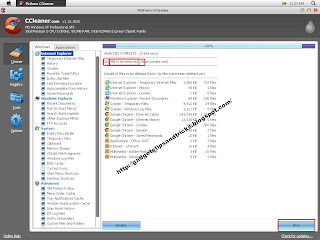
open ccleaner and delete temporary files,history,download history.cookes e.t.c from internet explore Google chrome,firefox e.t.c.

Trick 3:
Defragment your hard disk once a month
This will increase free space in your harddisk and rearrange all your files in order

Trick 4:
After closing any applications refresh desktop frequently.This will remove unuseful files from RAM
Trick 5:
Set images lessthan 65 KB as wallpaper.If you are using a low ram, it is better to remove your wallpaper because wallpaper uses huge ram

Trick 6:
don't fill your desktop will number of shortcuts,Each shortcut will use 400-500 bytes of ram
Trick 7:
Empty your RecycleBin regularly.it is better to use Shift+Del rather than Delete
Trick 8:
Clean your cpu from dust.Dust makes the cpu cooling fan jam and it makes your computer work slowly

Trick 9:
Open RUN > type %temp% > hit enter > delete all files ( Better to do Shift+del)

Trick 10:
In the same way type prefetch in run and delete all files

There your go.......now your computer speed increases by 150%
Just follow these steps and increase your computer speed by 150%
Trick 1:
Don't open any applications untill your computer bootsup completely

Download CCleaner
CCleaner
Password:gadgetstipsandtricks
open ccleaner and delete temporary files,history,download history.cookes e.t.c from internet explore Google chrome,firefox e.t.c.


Defragment your hard disk once a month
This will increase free space in your harddisk and rearrange all your files in order

Trick 4:
After closing any applications refresh desktop frequently.This will remove unuseful files from RAM
Trick 5:
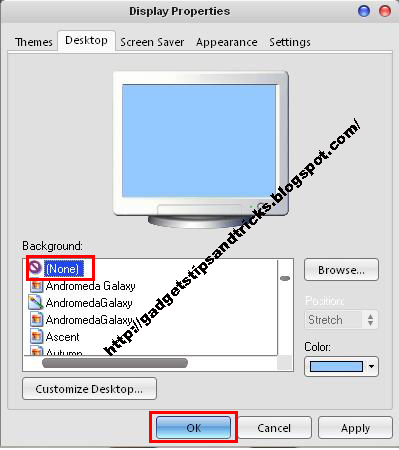
Set images lessthan 65 KB as wallpaper.If you are using a low ram, it is better to remove your wallpaper because wallpaper uses huge ram
Trick 6:
don't fill your desktop will number of shortcuts,Each shortcut will use 400-500 bytes of ram
Trick 7:
Empty your RecycleBin regularly.it is better to use Shift+Del rather than Delete
Trick 8:
Clean your cpu from dust.Dust makes the cpu cooling fan jam and it makes your computer work slowly

Trick 9:
Open RUN > type %temp% > hit enter > delete all files ( Better to do Shift+del)

Trick 10:
In the same way type prefetch in run and delete all files


